Basic tutorial on how to add Ai in the Nextjs project.
Note: We will be using actions and not proper HTTP route.
Packages to install
@ai-sdk/google
ai
@ai-sdk/rsc
What each package does
ai → Core AI SDK (handles streaming, models, helpers)
@ai-sdk/google → Lets the SDK talk to Google Gemini models
@ai-sdk/rsc → Enables streaming between Server Actions and React (RSC protocol)
Create a file actions.ts in any folder (preferably UI folder):
"use server"
import { google } from "@ai-sdk/google";
import { createStreamableValue } from "@ai-sdk/rsc";
import { streamText } from "ai";

export async function generate(){
 const stream = createStreamableValue('');
 const prompt = "Create a list of three open-ended and engaging questions formatted as a single string. Each question shoould be seperated by '||'. These questions are for an anonymous social messaging platform, like Qooh.me, and should be suitable for a diverse audience. Avoid personal and snsitive topics, focusing instead on universal themes that encourag friendly interaction. Foor example, your output should be structured like this: 'What's a hobby you've recently started? || if you could have dinneer with any historical figure, who would it be? || What's a hobby you've recently started? If you could have dinner with any historical figure, who would it be? || What's a simple thing that maes you happy?'. Ensure the questions are intriguing, foster curiositty, and contribute to a positive and welcoming consersatin enviornment";

(async()=>{const { textStream } =streamText({
  model: google("gemini-3-flash-preview"),

  prompt: prompt,
});

for await (const text of textStream){
    stream.update(text)
}
stream.done();})();


return {output: stream.value}
}
First: This is NOT an API call
Because this function lives in a Server Action ("use server" file), when your client does:
const { output } = await generate();
React does not make an HTTP request.
Instead, React uses its internal RSC wire protocol to talk to the server.
Think:
Browser React ⇄ Next.js Server (RSC channel)
This special channel is why createStreamableValue works.
Step 1 — createStreamableValue('')
const stream = createStreamableValue('');
This creates a live stream container that React knows how to subscribe to.
This file is the client-side half of the streaming system.
It’s the part that listens to the live stream your Server Action is producing.
Think of it like this:
Server Action = producer of tokens
This component = consumer of tokens
"use client"
This tells Next.js:
This component runs in the browser.
That’s required because:
It uses useState
It handles button clicks
It updates UI live as text streams in
Imports
useState → stores the growing AI text as it arrives
generate → the Server Action (called like a normal function, no fetch)
readStreamableValue → reads the live stream created on the server
This function is special: it knows how to read the RSC stream pipe created by createStreamableValue.
maxDuration = 30
This tells Next/Vercel:
Allow this Server Action to run for up to 30 seconds.
Streaming AI responses can take time, so this prevents timeouts.
Stateconst [generation, setGeneration] = useState<string>("");
This holds the text as it grows token by token.
And your state keeps growing.
This is why the UI updates as the model types.
Rendering the result
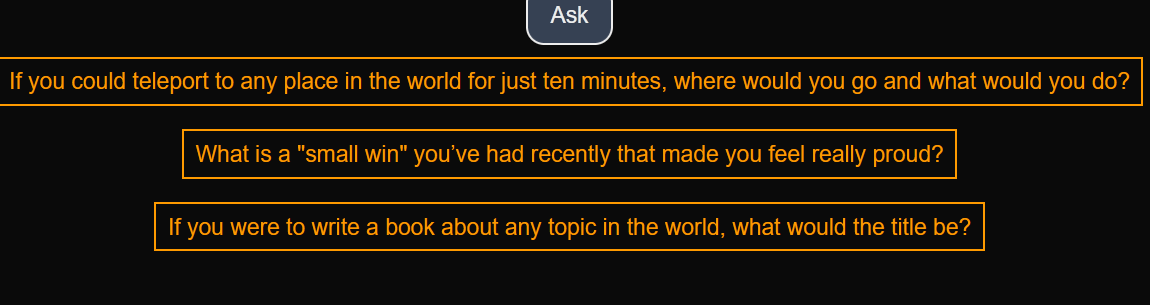
generation.split("||").map(...)
Remember your prompt asked the model to separate questions using ||.
Once enough text has streamed in, this split starts working and buttons appear progressively.
You are rendering partial results before the AI has even finished.
What is happening behind the scenes (timeline)
User clicks Ask
Client calls generate() (Server Action)
Server immediately returns a stream reference
Client starts listening to that stream
Gemini starts sending tokens
Server pushes tokens into stream
Client receives tokens and updates state
UI updates live
Server calls stream.done()
Loop ends